 WALKSCAPE
 Crosswave Edition
A Better-Looking Blogger Site with a Paid Theme
2025-12-21
Blogger has occupied an awkward spot in Korea. Naver Blog has a large readership inside its own ecosystem, and Tistory gave many people more control over their pages and advertising. When Tistory began placing its own ads on monetized blogs in June 2023, some publishers took another look at the alternatives. Blogger was one of them.
The trade-off was still there. WordPress can run anything from a blog to a store, depending on how you set it up. Blogger has a more limited job. It can publish a blog without asking you to maintain a server, and much of the design is left to the theme.
What the default design leaves you with
Design was the first thing that held me back.
The Blogger dashboard and some of the stock themes can feel like they come from an earlier period of the web. The editor can be familiar enough once you use it, but the first look at the site can make you wonder what you could do with it.
I noticed that most in the typography and layout. The first theme I tried did very little to help me picture the kind of publication I wanted.
What a different theme can change
A theme controls much of what a visitor sees, so there was still room to change the way the blog read.
A better layout can put the title, story list, photographs and navigation in a useful order without changing the Blogger editor underneath. It made a bigger difference to the public site than I had expected.
Third-party themes are sold individually, and some that I looked at were around US$15 at the time. Prices and support vary. Check the current listing and use the demo on a phone as well as a desktop before buying.
Where I looked for Blogger themes
Some sellers specialize in Blogger templates.
A free version can be enough to try a design. Compare which controls the paid version adds, what updates are included and whether you can install the layout without depending on scripts you do not want to run.
Two examples from my search were the following.
Whatever the vendor, check how it presents long headlines, article pages, navigation and credits before choosing.
Install the new theme
A Blogger theme generally comes as an XML file, sometimes inside a ZIP with documentation or assets. Use the file specified in the theme’s instructions.
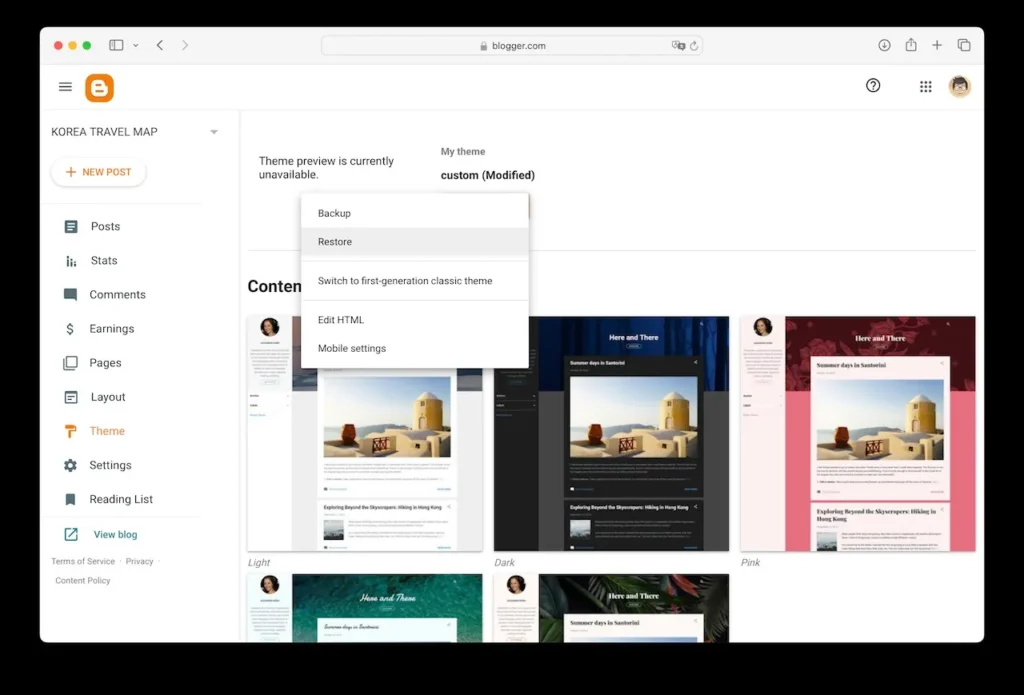
In Blogger, open Theme → More → Restore and upload the theme’s XML file. Keep the seller’s installation notes handy in case the template requires another step.
Back up your existing theme before replacing it. Save any custom HTML and CSS, analytics tags and widget settings you might need to restore separately. The layout can change enough that an old widget is missing or appears somewhere you did not intend.
Make the new layout your own
Use Layout to adjust the pieces the theme exposes, such as the logo, homepage sections and sidebar gadgets.
Themes divide the page in different ways. One change may affect the home page and another may only appear inside an article. Test a few posts, try the mobile view and check that navigation, links and any measurements you rely on still work.